WhatsApp officially launched its video calling feature on Tuesday, and the feature is now rolling out to Android, iPhone, and Windows users. An updated version of WhatsApp that supports video calling for Android and iPhone has been officially released, so all you need to do is update the feature to make your first video call. If your iOS or Android device isn’t set up to receive automatic updates, or you’re not sure if WhatsApp has been updated, simply head to the App Store or Google Play and check for available updates.
If you don’t see the video call option, or WhatsApp video calling isn’t working properly, or there’s an error with WhatsApp video calling, you can download the WhatsApp beta APK and see if things improve. If you can’t wait for a WhatsApp video call, follow these steps.
Please note that we recommend that you wait for the WhatsApp video calling feature to appear on your phone as this will also help with server load management. But if you are convinced that you want to start a video call right away, follow these steps.
How to Get WhatsApp Video Calling Feature Now
The WhatsApp video calling feature was recently introduced in the beta versions of WhatsApp for Android and Windows Mobile. You can sign up for the beta to get early access to WhatsApp video calling.
Please follow the steps below to register for the WhatsApp Beta program and enable WhatsApp video calling on Android:
- Open Google Play and search for WhatsApp
- Open the Google Play list of WhatsApp
- Scroll down to the bottom of the page
- in the talking part Become a beta tester Click I am here
- Confirm on the next screen and wait a few minutes
- Return to WhatsApp list page on Google Play
- You should see an option to update WhatsApp to beta
- Update application
Alternatively, if you know what you’re doing, you can download the WhatsApp APK (v2.16.354) that supports video calling from sites like APK Mirror or APK Pure. We recommend most of our readers to follow the above steps to officially get the video calling and other features of the WhatsApp beta version and skip the risks associated with downloading the WhatsApp APK.
(See also: Eight features of WhatsApp that will make 160 million Indians very happy)
If you have followed any of the methods above, then congratulations, you are now running the latest WhatsApp Beta for Android. It supports WhatsApp video calling and other new features – To make your first WhatsApp video call, follow the steps below.
To sign up for the WhatsApp beta on Windows Phone, you need to send a message to support@whatsapp.com and request a beta seat. The process involves human intervention, so it can be much slower. Once you enter the beta version, you will be able to use WhatsApp video calling on Windows Mobile.
iPhone users have no choice but to wait for the launch of WhatsApp video calling service.
How to make a WhatsApp video call
If you’re running the latest WhatsApp beta now – or if you’ll have access to the video calling feature after launch – it’s easy to start a video call with another WhatsApp user.
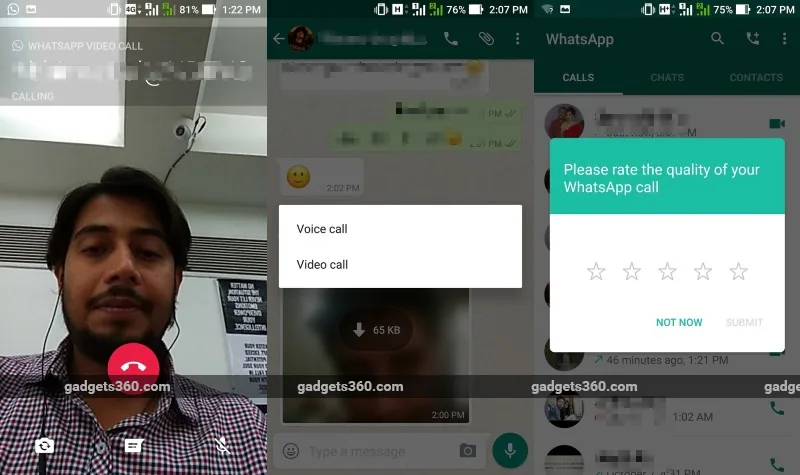
Here’s how to make a video call in WhatsApp:
- Open WhatsApp (of course!)
- Go to Contact information tab
- Find and tap the contact you want to start a WhatsApp video call with
- Click the phone icon at the top of the screen
- Select video call from the pop-up window
That’s it – you just made your first WhatsApp video call!
Please note that for WhatsApp video calls to work properly, both parties should be running a version of WhatsApp that supports this feature. WhatsApp may also prompt you to provide feedback after the video call ends.
What do you think of WhatsApp’s video calling feature? Let us know in the comments. For more tutorials, visit our how-to section.

