It has been a few weeks since the launch of Reliance Jio. The telco has attractive plans and it is free till December 31, so naturally, many people want to start using Jio.
The problem is that Reliance Jio runs entirely on 4G, so you won’t be able to use the network unless you have a compatible phone. If your phone doesn’t support 4G (for data) and VoLTE (for calls), you won’t be able to use Jio.
If this is the case, you have two options. One, you can buy a new phone – here are our picks of Jio-enabled phones – or two, you can use the company’s Jio4GVoice app for Android. Originally launched as JioJoin, Jio4GVoice is Reliance Jio’s dialer that can be used to make “rich” calls from Jio phones or use Jio without a 4G-enabled phone. This only works on Jio connection – you must have a Jio SIM in your phone, or be connected to a JioFi device. Here’s how it works.
How to download and set up Jio4GVoice app?
The steps given outline how to use the Jio4GVoice app. In the next section we’ll discuss whether you need to use it.
- First, install the app on your phone using the MyJio app or directly from the Play Store.
- If you are using a 3G phone, the app will ask you to connect to the JioFi Wi-Fi network.
- If you are using a 4G phone, it will use the 4G network to connect to Jio.
- Once you connect the app, it will authenticate your Jio connection.
- Then you have to click Get started Okay, let’s get started.
- Next, you will be asked to set Jio as the default SMS app. All you have to do is click No If you like, please add on this message.
Now Jio4GVoice is set up. You can use it as a dialer to call someone or send them a text message.
How to make calls using Jio4GVoice app?
Please follow these steps:
- Click on the contact. Now, just hold your phone to your ear and start talking.
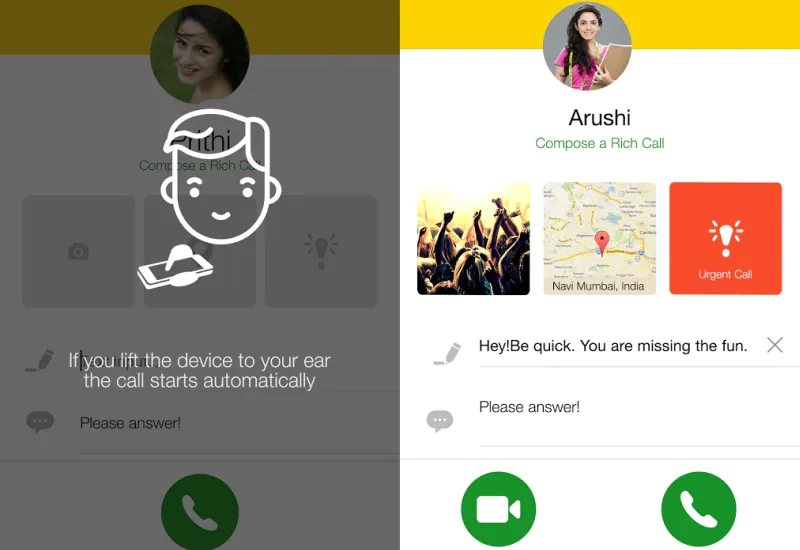
- If you are calling another Jio user, you can also “prepare” the call.
- You can tap the camera icon on the left to send an image, the location icon in the middle to send your location, or the emergency call icon on the right to mark the call as urgent and include a text message.
- You can click the video icon in the lower left corner to make a video call.
- Or you can click the phone icon in the lower right corner to make a voice call.
This is how it works.
I have a VoLTE phone, do I need Jio4GVoice app?
No, you don’t. Just use a regular phone dialer to make calls. Jio4GVoice has some bells and whistles, but you can easily overlook it.
Jio4GVoice allows you to send text messages to your contacts or call them. You can also connect multiple users via bridge calls, which is all you can normally do. When calling someone, you can also press the emergency call button, which will appear on the contact’s phone so they know it’s more than just small talk. You can also share your location or share an image while on a call, which sounds useful but is rarely used.
My phone has 4G but no VoLTE – do I need Jio4GVoice?
You may already know that if your phone does not support the VoLTE standard, you cannot make calls on the Reliance Jio network. Most Snapdragon 4G phones support VoLTE, as do quite a few MediaTek phones, so it’s an unlikely combination, but if you happen to fall into this group, then you’re going to have to use Jio4GVoice to make calls.
It works exactly as described in the first part of this article, and although we found the Jio4GVoice dialer a bit clunky, it’s your only option here.
I have a 3G mobile phone, is Jio4GVoice suitable for me?
If you have a 3G phone, you cannot use Reliance Jio directly on your phone. The solution here is to find yourself a JioFi Wi-Fi hotspot and connect your phone to it. There are some downsides to this, as you’ll need to carry two devices with you on the trip, but it’s still easier than going out and buying a brand new phone just to take advantage of Jio’s plans.
Getting JioFi and connecting your phone to it via Wi-Fi means your data is now served over the Jio network. You still can’t make calls using it, though, and Jio offers completely free voice calls. The good thing is that as long as your phone is connected to a JioFi hotspot, the Jio4GVoice app allows you to bridge the connection and make calls using the Jio network.

