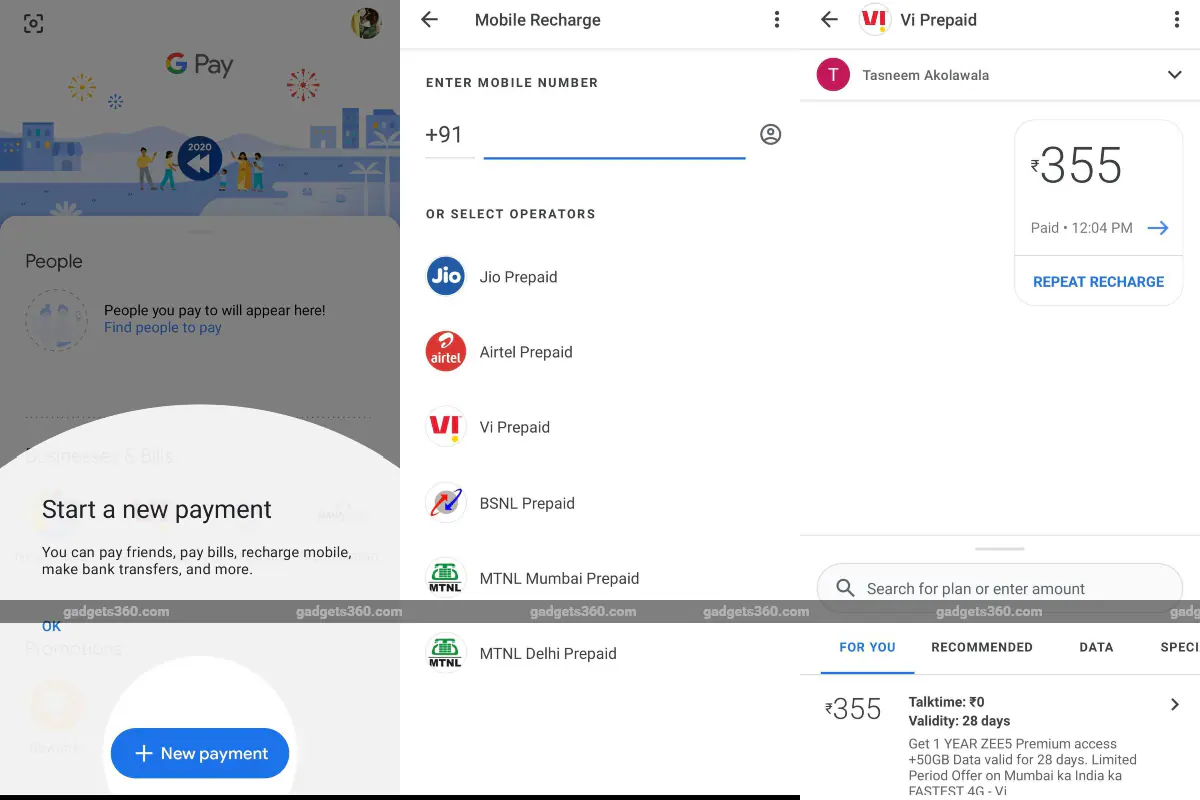
Google Pay, the tech giant’s digital payments app, is a popular platform for Indian users to send and receive money easily. However, the app also offers a range of offshoot services to its members, including the ability to recharge prepaid mobile phones. If you are a Jio, Vi (Vodafone Idea), Airtel, MTNL or BSNL user in India, you can recharge your phone through Google Play in just a few simple steps. In addition to mobile phone recharge, users can also pay water and electricity bills, gas bills, DTH recharge and other water and electricity bills through Google Play.
Google Pay is a convenient mobile recharge option for prepaid users in India. For those interested, here’s a step-by-step guide on how to top up your phone via Google Pay.
How to use Google Pay to recharge your mobile phone
Before starting these steps, if you’ve never used Google Pay, you must download it through Google Play or the App Store. Signing up on the free downloadable app is also a simple process. It will ask you to provide your mobile number and verify it through OTP for registration. Mobile recharge is free for prepaid customers of Jio, Vi (Vodafone Idea), Airtel, MTNL and BSNL. Please follow the steps below to recharge your phone via Google Pay:
-
Download Google Pay and follow the simple on-screen steps to sign up.
-
Grant the necessary permissions to the app for a seamless experience.
-
After registering, go to people section on the home page.
-
Click Mobile phone recharge And enter your mobile phone number to link.
-
You can top up any number by accessing your contact list on your phone, or typing it in directly if you type it verbatim. When you enter a number manually, Google Pay will suggest contacts from your contact list.
-
Once you select and link the number, it will give you a list of plans to choose from. There is one for you The tab provides suggestions based on your recharge history. There is another respected tab, a data tab offers plans with data benefits only, top–up Only tabs that provide airtime balancing, and Special recharge A tab that provides hybrid plan options.
-
Select the plan you want to top up. Once done, you will have to go and pay. First-time users must add their bank account details. These details only need to be added once and then saved for all subsequent transactions. To add your bank details, you must have your debit or credit card with you. Follow the above steps to complete the bank registration process, including creating a UPI PIN.
-
After adding bank account details, users can proceed to pay for mobile recharge plans. Google Pay will ask you to enter your UPI PIN again.
-
Once entered, your payment will be processed and the top-up will be credited to your prepaid account shortly. You will receive text message reminders regarding the payment process and account top-ups.
What are the most exciting technology releases of 2021? We discuss this on Orbital, our weekly technology podcast, which you can subscribe to via Apple Podcasts, Google Podcasts, or RSS, download the episode, or just hit the play button below.
Get daily tech news, reviews, and insights in 80 characters or less on technology shout Turbo. Connect with other tech enthusiasts on our forum. Follow us XFacebook, WhatsApp, Threads and Google News for instant updates. Watch all the action on our YouTube channel.
Starting today, landline to mobile calls will not be connected without the prefix “0”
Vaio E15, SE14 laptops with Full HD IPS displays launched in India: Price, specifications

