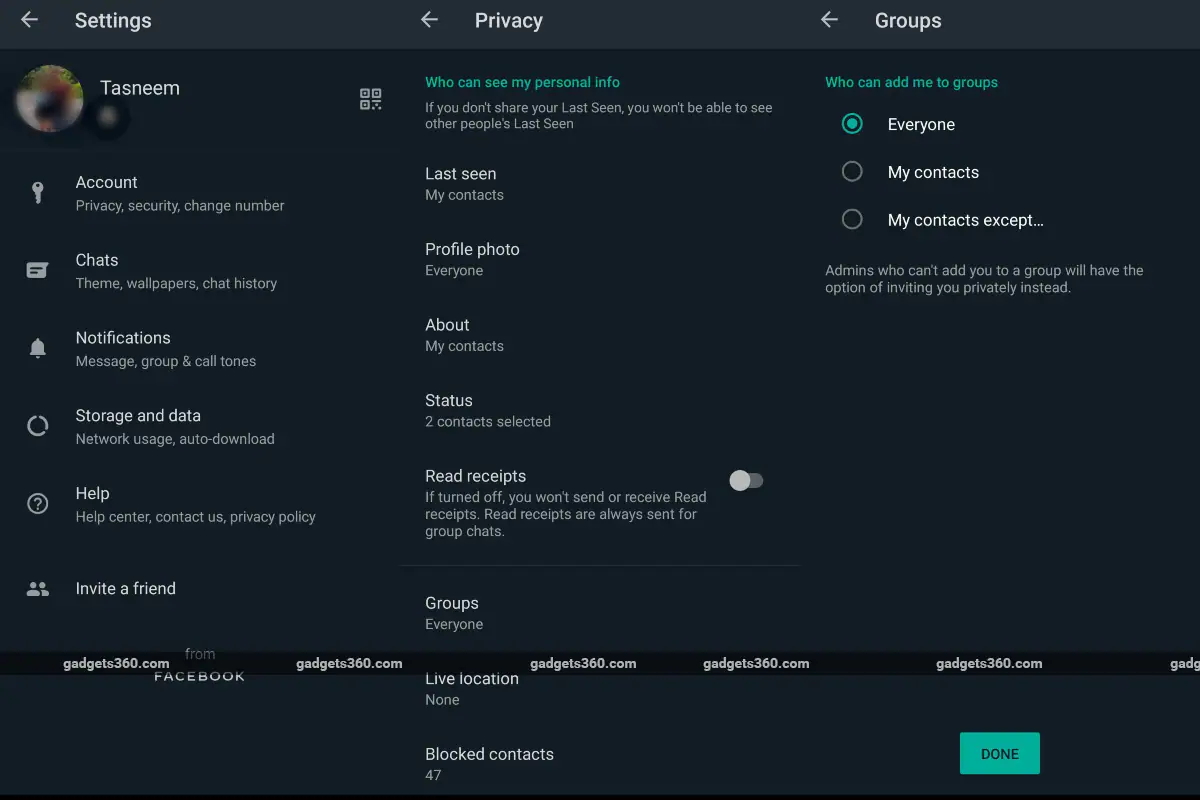
WhatsApp Groups are a great way to stay in touch with family, friends and even colleagues, but many people often take advantage of the feature by adding large numbers of people to groups to sell products or promote services. These groups are often created without the permission of the participants, which can be frustrating for many people. Most of us hate joining unnecessary groups and often consider whether it would be rude to withdraw from one. The best way to solve this problem is to use a filter that stops random people from adding you to the group.
How to prevent unknown users from adding you to WhatsApp groups
Thankfully, there’s a setting you can adjust in the privacy section of your WhatsApp account so you don’t get added to random groups. This setting allows you to customize who can add you to the group, by default it is set to “Everyone” which means anyone with your phone number can add you to the group. It’s worth noting that even if you adjust your settings, group admins can send you an invitation link and prompt you to join the group. To avoid being added to a group by random people, follow these steps:
-
Open WhatsAppclick three points in the upper right corner of the screen.
-
click set up option and click account.
-
Click privacy > group. The default setting may be set to “everyone‘.
-
You can choose from three options – “Everyone”, “My Contacts”and ‘My contacts except’.
-
The “Everyone” option allows anyone who knows your phone number to add you to the group without your permission.
-
The My Contacts option only allows those users to add you to groups whose numbers you have saved in their contact list.
-
The final “Exclude My Contacts” option allows you to further filter and remove contacts you don’t want added to the group, thereby choosing exactly who can add you to the group.
Get daily tech news, reviews, and insights in 80 characters or less on technology shout Turbo. Connect with other tech enthusiasts on our forum. Follow us XFacebook, WhatsApp, Threads and Google News for instant updates. Watch all the action on our YouTube channel.
VR headsets can help jurors reach more accurate verdicts, study shows
Google Play Protect on Android fails against malware detection apps like Avast, McAfee and others: AV-Test

