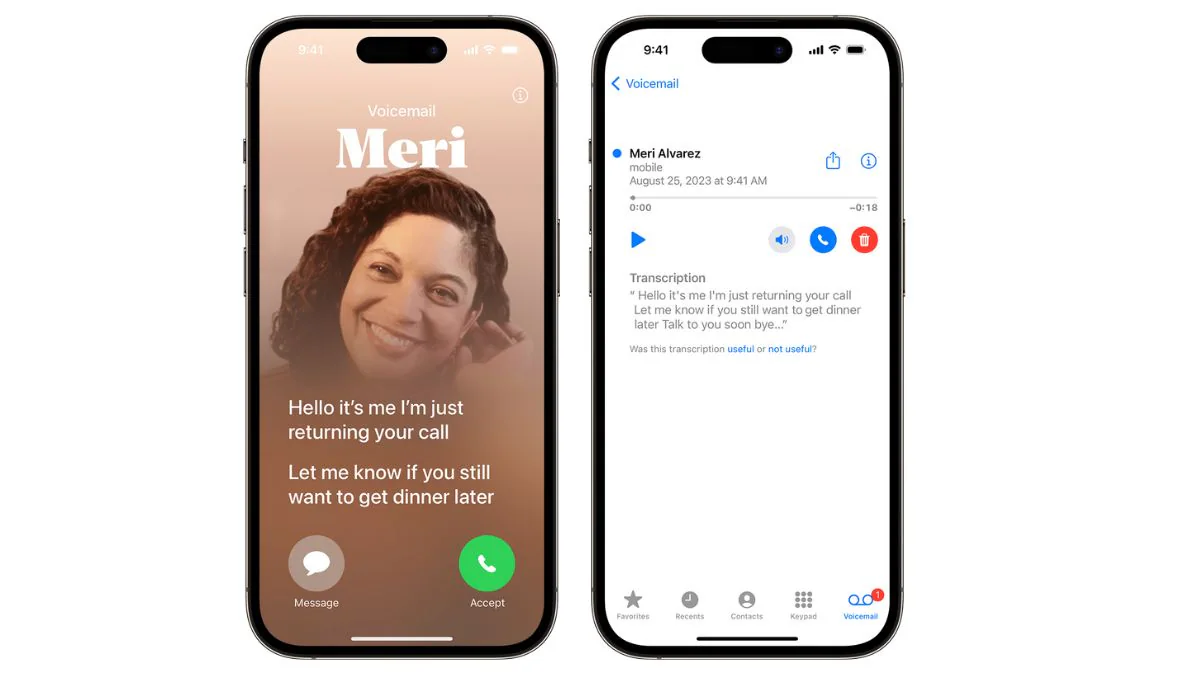
Apple has introduced live voicemail feature on iPhone in India with the latest iOS 18 update. This feature acts as an answering system for missed calls, allowing callers to leave messages. This feature includes both traditional voicemail and live voicemail with messages transcribed in real time. Users can listen to the recording or view the transcript in the Phone app. This feature enables efficient communication and ensures users don’t miss important updates, even if they are unable to answer calls. Here’s a step-by-step guide on how to disable the feature (if you don’t want to use it) and enable it (if you haven’t already)!
How does the voicemail feature work on iPhone?
When a call remains unanswered, the voicemail system logs the caller’s message after a preset duration. A recent iOS update introduced live voicemail functionality in major regions. This allows voicemails to be transcribed in real time, allowing users to filter and prioritize calls before answering them.
There are two main scenarios that callers encountering voicemail. They either hear the default system greeting or a custom greeting recorded by the user. These settings enhance communication between professionals and individual users.
Key features include:
- Record a message when the call is unanswered or unreachable.
- Live transcription via live voicemail.
- Save voicemails for future reference.
- Ability to customize greetings for a personalized touch.
How to enable voicemail on iPhone
Live voicemail is automatically enabled on iPhones running iOS 17 and later. If it is not activated, follow these steps:
- Open the Phone app on your iPhone.
- Click the Voicemail tab in the lower right corner.
- Select Set Up Now to begin the setup process.
- Create a password for your voicemail.
- Choose between a default greeting or a custom greeting. To record a custom greeting, follow the prompts.
- Save your settings to activate voicemail.
Tip: It is recommended to test the voicemail feature by calling your own number to make sure the greeting is working properly and meets your expectations. You can change your custom greeting at any time.
How to disable voicemail on iPhone
For users who don’t like using voicemail, you may want to disable the feature. Note that voicemail settings often depend on your carrier. Here’s how to do it:
The feature also includes the ability to listen to messages as they are recorded and save the transcription for future reference. Custom greetings can be set to personalize the caller experience. It is an invaluable tool for professionals and individuals seeking efficient communication management.
For users who wish to disable live voicemail:
- Open Settings and navigate to Phone.
- Find the “Live Voicemail” option.
- Turn this feature off to deactivate it.
Alternative method:
Some carriers allow users to disable voicemail by dialing a code. Please contact customer service or visit your carrier’s website to find specific instructions. For visual voicemail, you can also contact your mobile operator for assistance in disabling the service, as the service is carrier dependent.
Real-time voicemail feature
The live voicemail feature introduced in iOS 17 is a major upgrade to voicemail technology. It provides real-time transcription to help users manage calls efficiently. Here are some of its salient features:
- Live transcription: When callers leave a message, their words are transcribed into text. The transcript appears on the iPhone screen, allowing users to instantly determine the importance of the message.
- Call screening: Live voicemail allows users to decide whether to answer the call while the voicemail is being recorded. This is especially useful for screening unknown numbers.
- Spam detection: Calls marked as spam by your carrier will be automatically rejected and will not be recorded as voicemail. This saves time and prevents unnecessary emails from cluttering your inbox.
- Custom greeting: Users can personalize greetings for a more professional or friendly feel. This ensures callers feel recognized.
Frequently Asked Questions (FAQ)
What is voicemail used for on iPhone?
Voicemail allows users to receive and retrieve voice messages when they are unable to answer the phone. This ensures that no important communication is missed.
How to add a custom voicemail?
You can record a custom voicemail greeting by selecting Voicemail > Set Up Now > Custom Greeting from the Phone app. Follow the prompts to create a personalized message.
Is iPhone voicemail free?
Voicemail service is usually included with carrier plans, but some networks may charge for voicemail access or retrieval. It is recommended to confirm details with your service provider.
Will voicemails be deleted on iPhone?
Voicemails can be deleted manually or automatically after a specific period of time, depending on carrier settings. It is recommended to save important messages externally.

