Airtel offers eSIM services to users with selected smartphones, including some Apple, Samsung, Google Pixel, and Motorola Razr (2021) phones. eSIM or Embedded Subscriber Identity Module, as the name suggests, is embedded directly into your smartphone or any device, in place of or alongside your physical SIM card. The eSIM service not only saves space for handset manufacturers, but also enables remote SIM provisioning of any mobile device.
How to activate your Airtel eSIM
If you are an Airtel user, you can activate the eSIM feature as long as you have a compatible device. As mentioned before, the latest flagship phones from Samsung, Apple, Google, and Motorola Razr (2019) are all on the compatibility list. If the user has an eSIM, the mobile operator can remotely switch the user to a different circle or even switch their telecom operator remotely. To convert your physical SIM card to an eSIM card, follow these simple steps:
-
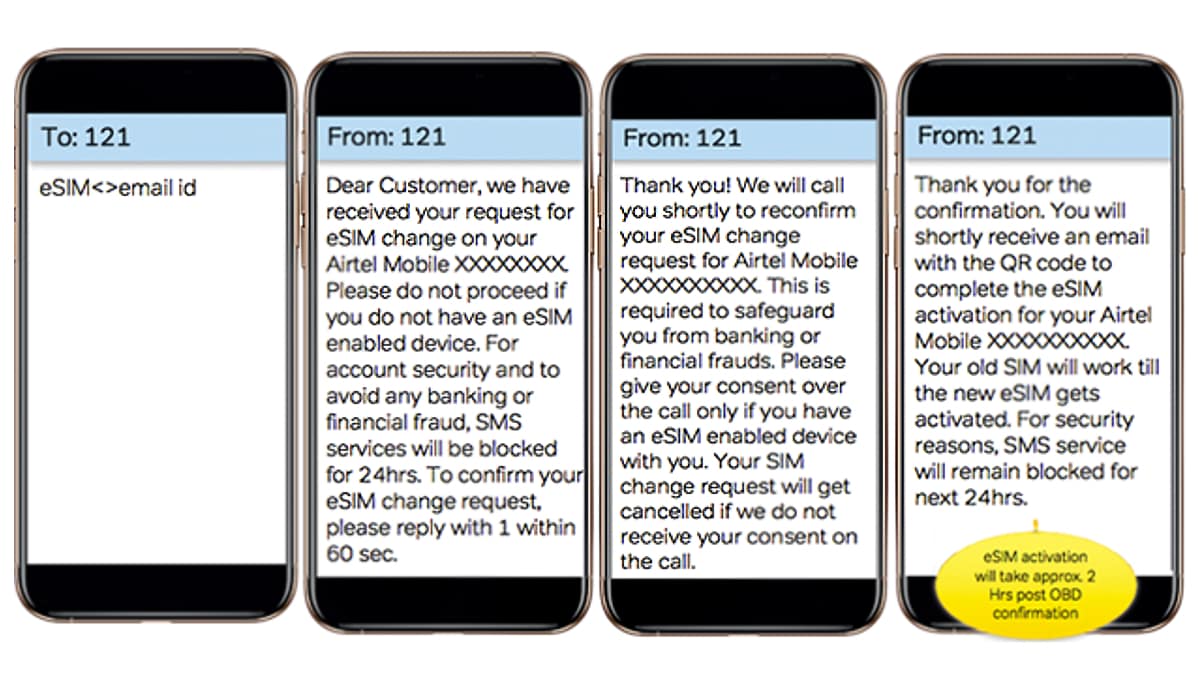
To start the process, send an SMS Embedded SIM card Register email ID to 121.
-
If your email ID is valid, you will receive an SMS from 121 confirming the initiation of the process. You need to reply “1” Confirm eSIM change requests within 60 seconds. If your email ID is invalid, you will receive an SMS from 121 asking you to restart the process with the correct email ID and you will also be instructed on how to update your email ID.
-
Once verification is complete, subscribers will receive another text message from 121 asking for your consent via phone call.
-
After giving your consent during the call, you will receive a final SMS from 121 regarding the QR code received on your registered email ID.
-
If you are an iPhone user, click Settings > Mobile Data > Add Data Plan > Scan the QR code. Scan the code you receive in the mail and make sure your phone is connected to mobile data/Wi-Fi when scanning. Once the scanning process is complete, click Tags eSIM below Labels for your new plan.
-
If you are a Samsung mobile phone user, please click Settings > SIM Card Manager > Add Mobile Plan > Add using QR code. Scan the QR code received in the email (make sure Wi-Fi or mobile data is available). Click after scanning Add to exist Add new mobile plan options.
-
If you have a Google Pixel phone or Motorola Razr, select Settings > Network & Internet > Wi-Fi > Connect to Wi-Fi network (required). then go to mobile network exist Settings > Advanced > Carrier > Add carrier > Scan the QR code Received via email (make sure your phone is connected to Wi-Fi when scanning). After scanning, click Download > Complete.
-
A must-visit for Motorola Razr 5G users Settings > Network & Internet > Select the + sign next to Mobile Networks > Click Next (Download your SIM card). Scan the QR code received in the email (make sure your phone is connected to Wi-Fi/mobile data when scanning). After the scan is successful, click activation.
-
Airtel points out that the QR code is unique and can be used only once on a device. After scanning, make sure to complete the process of adding your carrier. Customers should not select “deleteoption in the eSIM settings as this will permanently delete the eSIM profile.
-
If the postpaid user does not receive the email with the QR code within 30 minutes, or the subscriber terminates the scanning process midway, it needs to be sent as a text message Nosim to 121 to avoid physical SIM card disconnection.
-
Likewise, prepaid users need to leave a message NESIM Go to 52212 (for prepaid numbers in Andhra Pradesh, Telangana, Kerala, Tamil Nadu, Karnataka) and NESIM to 51619 (for prepaid numbers in rest of India) to avoid physical SIM card disconnection.
-
Airtel said the eSIM will be activated within about 2 hours of scanning the QR code. During this period, the physical SIM card will continue to work.
Get daily tech news, reviews, and insights in 80 characters or less on technology shout Turbo. Connect with other tech enthusiasts on our forum. Follow us XFacebook, WhatsApp, Threads and Google News for instant updates. Watch all the action on our YouTube channel.
Microsoft Surface Duo 2 specifications have been listed via Geekbench, may feature Snapdragon 888 SoC
How to activate your Jio eSIM

