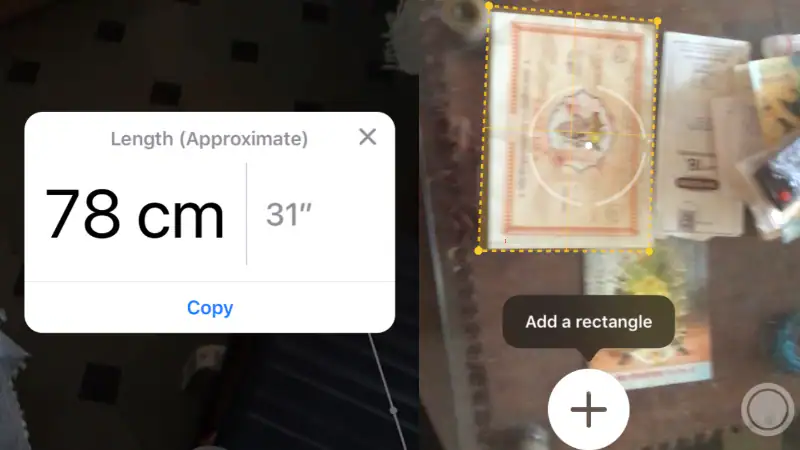
Measurement app allows you to measure the distance between two points as well as the dimensions of certain objects. It’s been a while since we’ve seen similar apps on the App Store, but the iOS 12 Measure app was designed by Apple and released with the latest version of iOS. This makes it more likely that people will use it for measurements. We measured a bunch of objects in our home using the measuring app and had overall positive results. Before using the Measure app, keep in mind that it may work better on iPhone 8 and newer iPhones because those phones’ cameras are better optimized for AR. We tested the app using an iPhone 7 and the results were pretty good, but not 100% accurate. We’re not ready to throw away the tape measure just yet, but iOS 12’s Measure app is a reliable backup in case it’s not around.
18 hidden iOS 12 features everyone should use
How to measure objects using the iOS 12 Measure app
Follow these steps to take measurements using the Measure app for iOS 12:
- Open the Measure app on iOS 12.
- Point the camera at the object you want to measure. Whether it’s a small box or an entire room, the performance of the measurement application is equally reliable.
- Now a big one plus button will appear on the screen with A circle with a dot in the middle. Point the point to the starting point you want to measure and click plus button.
- Now point the point to the end point and click plus button. This will display the distance between these two points on the screen.
- Sometimes when you point your camera at a rectangular object you’ll see Add object button. Click on it to view the length and width of the object.
- There are four buttons on the screen of the Measurement application. The button in the upper left corner allows you to undo the measurement, the button in the upper right corner allows you to undo the measurement Clear button allows you to reset all measured values, lower right corner photo button allows you to take a photo of the measurement results, as well as large plus button Add measurement points.
12 amazing new features in iOS 12
We noticed that the distance measured by the measurement app was off by a few centimeters at most. We measured a mattress 1.7m long (the app says 1.72m), a box 14cm in diameter (the app says 14cm), a book 14cm long and 25cm wide (the app says correct) and a table 60cm wide (the app says 61cm). On our iPhone 7, the results were generally pretty reliable compared to a physical tape measure.
iOS 12 release date, time and how to install on iPhone, iPad or iPod Touch
How to check fluid levels using the iOS 12 Measure app
The measurement app also allows you to check whether an object is vertical or horizontal. It was previously in the Compass app, but now it’s part of the Measurement app.
How to enable or disable automatic software updates on iOS 12
The level feature was part of the Compass app in iOS 11, but in iOS 12 it has been moved to the Measure app
- Open the measurement application. tap grade Once you point the camera at the desired object, it will appear in the lower right corner.
- Align the camera until the angle is 0 degrees for proper leveling.
iOS 12 Screen Time: How to reduce iPhone addiction
That’s pretty much everything you need to know about the Measure app on iOS 12. How are you using the Measure app? Let us know in the comments.
iOS 12: How to make notifications deliver silently and ungroup notifications
For more tutorials, visit the “How To” section.
Will Apple launch an affordable iPhone in India? We discuss this on Orbital, our weekly technology podcast, which you can subscribe to via Apple Podcasts or RSS, download the episode, or just hit the play button below.

