


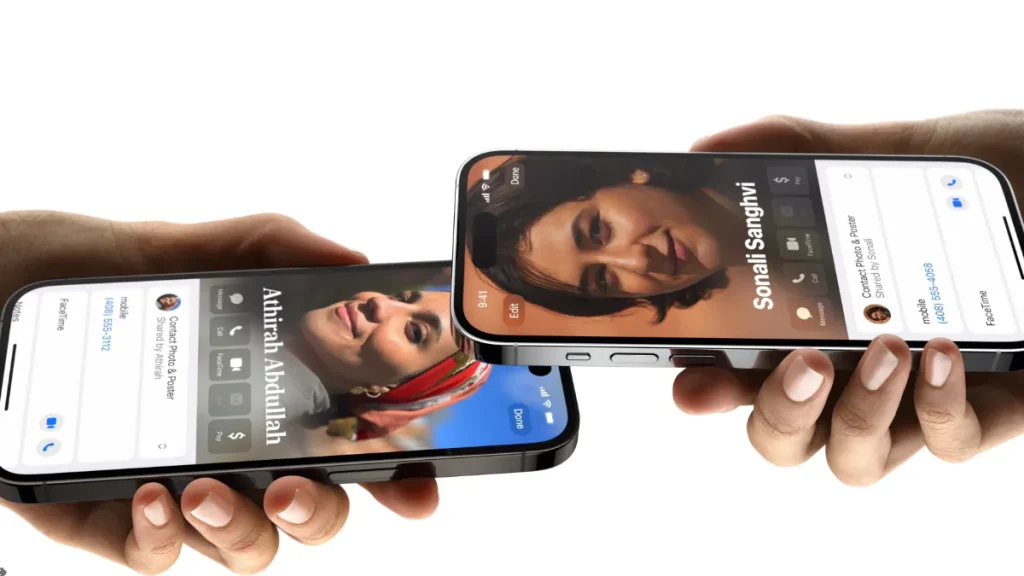
Apple released iOS 17 to all users around the world earlier this month along with the new iPhone 15 series. The latest version of the iPhone operating system has many interesting features and upgrades, including the new NameDrop functionality. This feature works similarly to AirDrop, allowing you to share contacts by bringing your iPhone close to another person’s iPhone. This can also be achieved by combining an iPhone and Apple Watch. However, Apple will bring this feature to wearables in an update later this year.
How to use NameDrop feature on iOS 17
iPhone users must turn on AirDrop to use the NameDrop feature. This can be done by going to Settings > Select General > AirDrop. Make sure your AirDrop is available to everyone and both iPhones are running iOS 17. Learn how to exchange contacts with another iPhone.
- Hold the top of your iPhone close to the top of the other person’s device.
- The tops of both devices will light up to indicate successful pairing, and NameDrop will appear on both screens.
- Continue holding and NameDrop will appear on both screens.
- You can choose to share or receive only or both.
- To cancel, move both devices away before NameDrop completes.
NameDrop only works for sending new contact information, not for updating existing contacts. Users can close NameDrop by entering Settings > Select General > AirDrop and switch Integrate devices together options. Apple has confirmed that NameDrop will be available on Apple Watch in an update later this year.
iOS 17
Apple’s iOS 17 software has been available for eligible iPhone models since last week. In addition to NameDrop functionality, the latest operating system brings a number of improvements and new features to iPhone models, including a standby mode and a live voicemail feature that allows users to read a live transcript while the caller is speaking. In iOS 17, the Health app offers new mental health features with reminders showing shopping lists. It also includes the Apple Journal app and offline maps, which let you share AirTags and other Find My-enabled accessories with other users.
Get daily tech news, reviews, and insights in 80 characters or less on technology shout Turbo. Connect with other tech enthusiasts on our forum. Follow us XFacebook, WhatsApp, Threads and Google News for instant updates. Watch all the action on our YouTube channel.
Meta uses public Instagram, Facebook posts to train its new AI assistant
Google launches earthquake warning system for Android smartphones in India