


Zoom has a popular audio notification feature that lets you know when participants join or leave a meeting. This is especially useful when you’re waiting for someone, but it can be annoying when you’re at a large meeting or event and you keep hearing notifications as people come and go. Audio notifications have a doorbell-like sound that makes you feel like a real person is ringing the doorbell behind a real door. Just like your doorbell, there is a way to turn off audio notifications for a virtual Zoom meeting room.
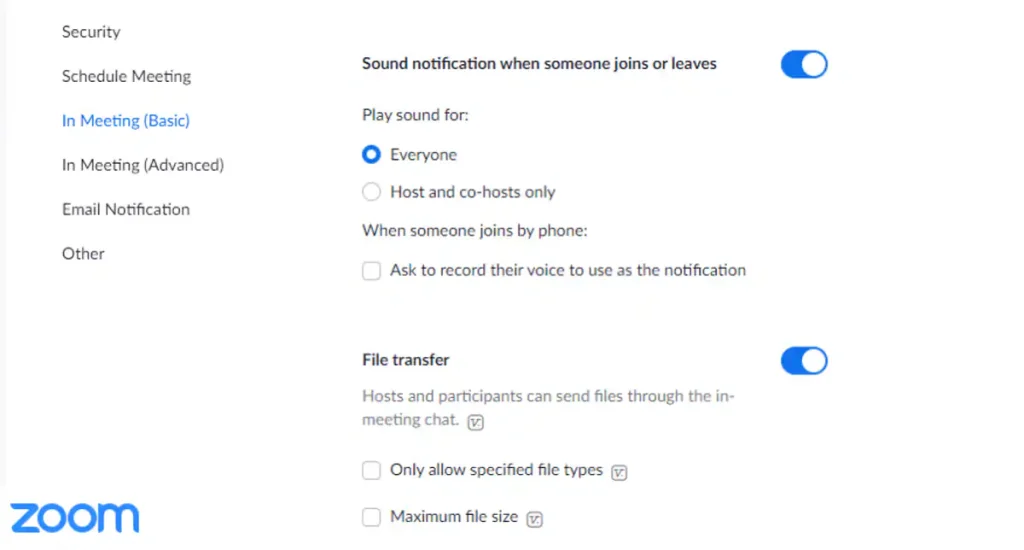
Audio notification options on Zoom also offer a variety of customization features, such as choosing to play the sound for everyone or restricting the sound to hosts and co-hosts. There is also an option to ask for the user’s voice to be recorded to be used as a notification when someone joins via phone
How to turn on/off Zoom audio notifications
Users on a Zoom call can easily toggle audio notifications based on their preference. This can be done before the call starts or even during the meeting. If you turn off audio notifications, you won’t receive audio alerts every time a user leaves or enters a Zoom meeting. This feature is very important for users who are waiting for someone and doing other chores at the same time. The audio tune acts as an alert that someone has entered the Zoom call, which is especially useful when you’re not looking at the screen. Please follow the steps below to turn off/on audio notifications on Zoom.
-
If you are logged in to your Zoom account through a web browser, click set up Options are in the left column. If you are using the Zoom app, click your Profile icon > Select set up > View more settings.
-
In settings, click In a meeting (basic) In the left column and scroll down. Search for a name named ‘Sound notification when someone joins or leaves. Turn this feature on or off according to your preference.
-
If you turn it on, you can choose from three options. The first lets you play a sound for everyone, the second only lets you play a sound for hosts and co-hosts, and the last lets you record a user’s voice as a notification, only for those who join by phone.
Get daily tech news, reviews, and insights in 80 characters or less on technology shout Turbo. Connect with other tech enthusiasts on our forum. Follow us XFacebook, WhatsApp, Threads and Google News for instant updates. Watch all the action on our YouTube channel.
Loki release date and time, cast, episodes, trailers, reviews and more
MIT researchers create programmable digital fibers that can be sewn into fabrics