


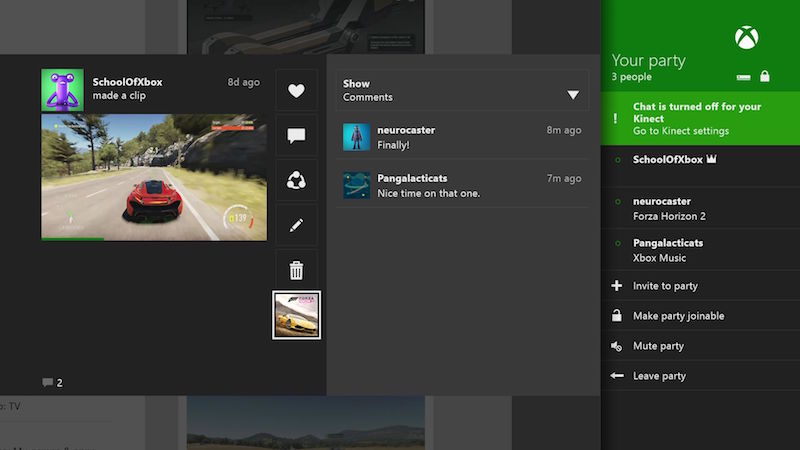
One of the coolest features of the Xbox One is the ability to create “Parties.” Parties bring you and up to eleven other friends together to talk to each other. Think of it like a Skype group call, only while you’re playing your favorite multiplayer game. Chat happens in parallel to the game you’re playing, so your friends can join you and play and chat with you.
This comes in handy for games with strong multiplayer components like Destiny and Halo, which are better suited to playing with friends. You can strategize together, or just make fun of a friend who did something extremely stupid in the game.
There are three ways you can start a party on Xbox One. Here’s what you need to know.
1) Invite from your friends list
Start a party by inviting other players to join the group. You’ll use this method to send invitations one at a time.
1. From the Home screen, go to Friend Center and select friends watt.
2. Select the friends you want to invite.
3. Select sendthen select party invitation.
4. Your Xbox team will appear on your screen.
(See also: How to take a screenshot and share it on Xbox One)
2) Attend a party with your friends
If someone else has already started the party, you don’t need to wait for an invitation. 1. Go to Friend Center and select friends watt.
2. Select a friend and on that friend’s player card, scroll down to join in and select party.
3) Invite multiple friends and start your own party
Want to quickly throw a party with a large group of friends? This is the easiest way.
1. Select breakthen select party.
2. Select invitation to party.
3. Select the friend you want to join from the pop-up list.
4. Finally, select party from list Invite to participate options.
(See also: How to Share Xbox One Games)
Remember, to start or join a party, you need an active Xbox Live Gold membership and must be logged in to the gamertag associated with that membership. Also keep in mind that the party does not remain active when you turn off the console. You must start a new party.
Do you party while playing games? Let us know in the comments which multiplayer features you use most.
Get daily tech news, reviews, and insights in 80 characters or less on technology shout Turbo. Connect with other tech enthusiasts on our forum. Follow us XFacebook, WhatsApp, Threads and Google News for instant updates. Watch all the action on our YouTube channel.
OnePlus X aka OnePlus Mini bundle to launch on October 29
Samsung Z3 comes with a 5-inch display, Tizen 2.4 operating system and is priced at Rs. 8,490