


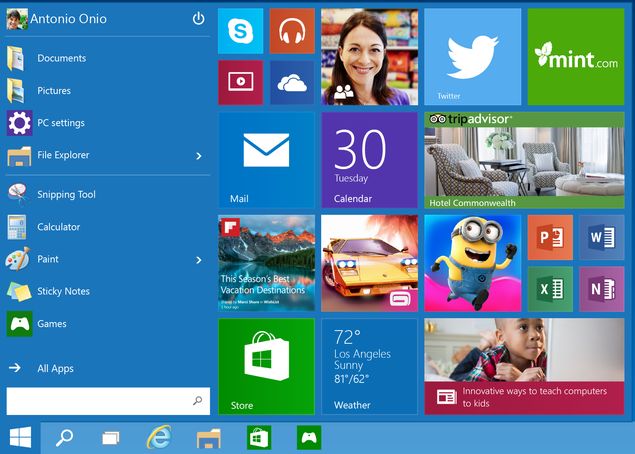
Microsoft released the next version of Windows on September 30, choosing to skip version numbers and jump from 8 to 10. While the final version of Windows 10 is expected to be released in 2015, a technical preview (for PC experts who understand the risks involved in downloading unfinished software) will be available starting October 1.
Learn about Windows 10 Technical Preview
In this preview, Windows 10 will get a lot of changes with the update, and you’ll have access to the Windows Feedback app. This app helps send feedback to Microsoft about the different features they added and removed to Windows 10 during the preview period, helping you be part of the team that improves and refines the operating system.
Apart from this, there are many new features you can try in Windows 10. First, it has a new Start menu – a mix of live tiles and classic desktop apps. Windows apps also don’t have to run in forced full-screen mode, making them more useful to desktop users. Windows 10 also features much improved File Explorer and search capabilities.
(See also: Ten things we know about Windows 10)
Windows now finally supports multiple desktops. If these are the features you’ve been craving since switching to Windows 8, the Windows 10 Technical Preview will be very appealing.
warn
Before proceeding to try this version, be aware that you may encounter system-breaking bugs and end up losing data. If you install Windows 10 on your primary computer, we recommend taking a full backup. Microsoft recommends that you install it on a secondary PC, which is wise advice when working with unfinished software.
How to download Windows 10 Technical Preview
If you still want to proceed, follow the steps below to download the Windows 10 Technical Preview.
1. Use this page to join the Windows Insider program.
2. Make sure your computer meets the Windows 10 minimum system requirements:
- Processor: 1 gigahertz (GHz) or faster
- RAM: 1 GB (32-bit) or 2 GB (64-bit)
- Available hard drive space: 16 GB
- Graphics Card: Microsoft DirectX 9 graphics device with WDDM driver
- Microsoft account and Internet access
Microsoft also points out that you will not be able to use Windows Media Player to play DVDs after installing the preview version. It said certain processors and hardware configurations may be blocked from installing the preview, but did not reveal any specific models. Currently, the preview version only supports three languages: English, Simplified Chinese, and Brazilian Portuguese.
3. Download the Windows 10 Technical Preview installation file directly from the following link:
4. After downloading one of these files, you can use an application like ImgBurn to burn the Windows 10 image file to a DVD or USB pen drive.
5. Double-click (double-click if using a touch device) setup.exe, and then follow the on-screen instructions.
If prompted for a Windows 10 Technical Preview product key, use NKJFK-GPHP7-G8C3J-P6JXR-HQRJR
User data and rollback
If you installed a preview on Windows 7 or 8 and later, you should be able to keep your Windows settings, personal files, and most apps when you upgrade to Windows 10 Technical Preview. However, Windows Vista users will have to do a fresh install, and since the Windows 10 Technical Preview only supports x86, Windows RT users are completely out of luck.
If after installing the Windows 10 Technical Preview, you want to go back to an older version of Windows for some reason, you’ll need to make preparations before installing the preview. Windows 7 or Vista users should use software provided by the PC manufacturer to create recovery media from the recovery partition on their PC. Users of Windows 8 or higher should create a USB recovery drive.
Before proceeding to install Windows 10 Technical Preview, check the Microsoft website for more information.
Updates and other information
After installing the preview version, you will get automatic updates. Your preview will expire on April 15, 2015, at which time we will make a consumer preview of Windows 10 available. Microsoft has released instructions to help you get familiar with the new Windows 10 operating system.
The Windows Insider program allows users to stay on top of the latest Windows software. Microsoft will release updates frequently and you can download them as they become available.
A consumer preview of Windows 10 will be available early next year, which will likely be a better option for most users. If you can’t wait, you can download early versions of Windows 10.
For more tutorials, visit our How-To section.