


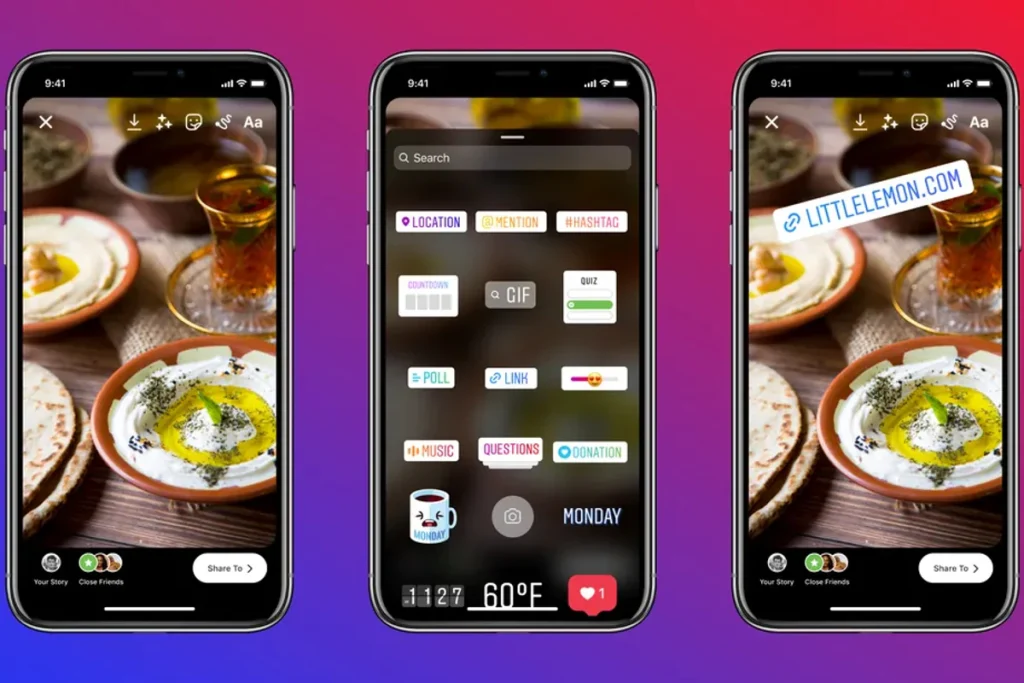
Instagram recently improved the ability to add links in Stories with a new link sticker option. Previously, this feature was only available to selected users, and links appeared as a swipe-up button at the bottom. However, with recent changes, users can now add links to any part of the story on the screen. The swipe-up method of linking stories on Instagram is only available for users with more than 10,000 followers. However, this restriction has been lifted and now all users on Instagram can post links in their Stories using link stickers.
How to add Instagram Stories link
Now that the condition for accounts to add links has been removed, this feature is available to all users on Instagram. The company recently announced the global rollout of link stickers, so it might be a while before they’re added to all accounts. The link can be pasted anywhere on the Instagram Story. Follow these simple steps to add a link to your Instagram Stories.
-
Go to the Instagram app and swipe right. The option to publish the story appears. Users can post photos or videos as stories.
-
After inserting a photo, swipe up to open the sticker tray. this association Options should appear below the GIF and next to the voting widget options.
-
click association option and paste the URL you want to add to your story.
-
The link will then appear like any other sticker on Instagram Stories. The link sticker can be moved and placed in any part of the story.
-
The link sticker is clickable and when clicked, will take the user to the published URL.
-
Users can then post the story to their account by clicking share options.
Get daily tech news, reviews, and insights in 80 characters or less on technology shout Turbo. Connect with other tech enthusiasts on our forum. Follow us XFacebook, WhatsApp, Threads and Google News for instant updates. Watch all the action on our YouTube channel.
Realme Q3T specs, price revealed via China Telecom listing