


For many people, YouTube is one of the best places to listen to music for free, but while the site makes it easy to find videos and make playlists, if you’re just looking for a way to listen to music while doing other work, it’s not the best place to listen to songs without distractions like related videos and ads. If you want to use YouTube as a simple, neat music player, then you might want to try these methods.
utifi
Youtify is a web-based service that lets you play songs from YouTube, Soundcloud, and Official.fm. The website lets you search for YouTube videos and add them to playlists. You can also log in to your Google account to sync your YouTube playlists. The videos appear in a small box in the lower left corner of the screen, and you can also watch these videos in full screen, so you can listen to the music most of the time, and if there’s a song you really like, then you can take a break and watch the video.
Some YouTube channels, like Vevo, don’t let you play videos on sites like Youtify, but that’s not a problem because Youtify will automatically play an alternative video for the same song. Although Youtify has the most basic music playback controls, it doesn’t have a repeat button. This means you won’t be able to listen to songs or albums on a loop. Youtify’s settings menu also allows you to choose video quality. You should keep in mind that if the video quality is set very low, the sound quality will suffer.
Queuemusic and Tubalr are two good alternatives to Youtify. While the former may appeal to pixel art fans, the latter makes it easy to search for songs by genre – good for finding new music.
Streamus (Google Chrome)
If you want to listen to music on YouTube instead of watching videos, Streamus is a great Chrome extension for you. It lets you create your own playlists, sync YouTube playlists, search for songs, play in shuffle or repeat mode – all from within the Chrome browser. The Streamus’ minimalist design will appeal to those who like to play music in the background. Although Streamus is simple, it has most of the features you need. This includes a feature called Online Radio, which helps you find new music based on what you’ve listened to. By default, you must access the Settings menu to view the search menu. When searching, make sure you don’t misspell a word, as Streamus has yet to feature Google’s excellent “Did you mean…” search feature?
Android
The Chrome extension doesn’t work on smartphones, but there are some easy ways to play YouTube videos on Android and iOS. The YouTube app on Android and iOS stops playing videos when you switch apps. There are rumors that Google is working on a fix for Android. Until then, you can download PVSTAR+, a free YouTube player that runs continuously in the background. Load the songs or playlists you want and just press the home button. You can control playback by accessing Android Notification Center by swiping down.
Another way to use YouTube as your main Android music player is to use a floating YouTube app like Floating YouTube Popup Video, which allows you to keep YouTube videos open while using other apps. However, these apps may not be suitable for small screen phones or older phones as this may also cause some lag.
iOS system
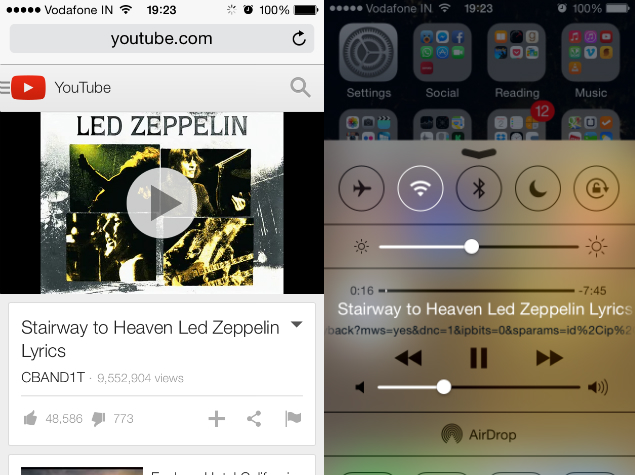
Surprisingly, streaming songs from YouTube on iOS is surprisingly easy, as Digital Inspiration explains in a blog post. All you have to do is open youtube.com on Safari, play any video and press the home button. Now swipe up from the bottom of the screen to open the Control Center. Here, click on the play button to start playing the song in the background.
These apps are great for those who want to make the most of YouTube’s massive music collection. If you found these useful, or if we missed your favorite YouTube music player, please leave a comment in the comments section below.